Microsoft 365 Management for Businesses: Streamline IT and Boost Productivity with Wahaya IT

Microsoft 365 management is the day-to-day administration, security, and tuning of Microsoft’s cloud productivity platform so it runs reliably, stays secure, and delivers measurable business value. This piece shows how thoughtful M365 management reduces IT overhead, cuts cost and risk, and improves team productivity for small and mid-sized businesses. We walk through why M365 matters for SMBs, what managed services include, how to secure and migrate environments, ways to control licensing costs, and how to accelerate user adoption through training and automation. Common pain points—scattered administration, wasted licenses, and security gaps—are answered with clear, practical steps and checklists you can use right away. The sections that follow unpack assessment, managed services, security baselines, migration phases, license optimization, and adoption programs, and point out where vendor support can help execution and ROI.

Why is Microsoft 365 Essential for Small and Mid-sized Businesses?

Microsoft 365 bundles Office apps, Exchange Online, Teams, SharePoint, OneDrive, and built-in security into a single cloud platform that’s easier for SMBs to manage than a mix of on-prem systems. It centralizes identity with Azure Active Directory, brings together security controls, and connects automation through the Power Platform—giving consistent management, predictable costs, and scalable collaboration. For SMBs, the main benefits are simpler IT operations and lower capital expenditure because updates, backups, and many security responsibilities move to the cloud. Those platform-level efficiencies translate into concrete outcomes: lower costs, stronger security, and faster teamwork.

Microsoft 365 delivers five core business advantages for SMBs:

  • Lower overall cost by cutting hardware needs and consolidating licensing and support.
  • Built-in security and compliance features like MFA, DLP, and Microsoft Defender.
  • Real-time collaboration through Teams, co-authoring, and SharePoint document management.
  • Scalability that lets you add or remove services quickly as needs change.
  • Integration with automation and identity tools that reduce routine admin work.

Those strengths make Microsoft 365 a practical alternative to fragmented productivity tools—and they set up how managed services and governance can unlock the platform’s full value.

What are the key benefits of Microsoft 365 for SMBs including cost reduction and security enhancement?
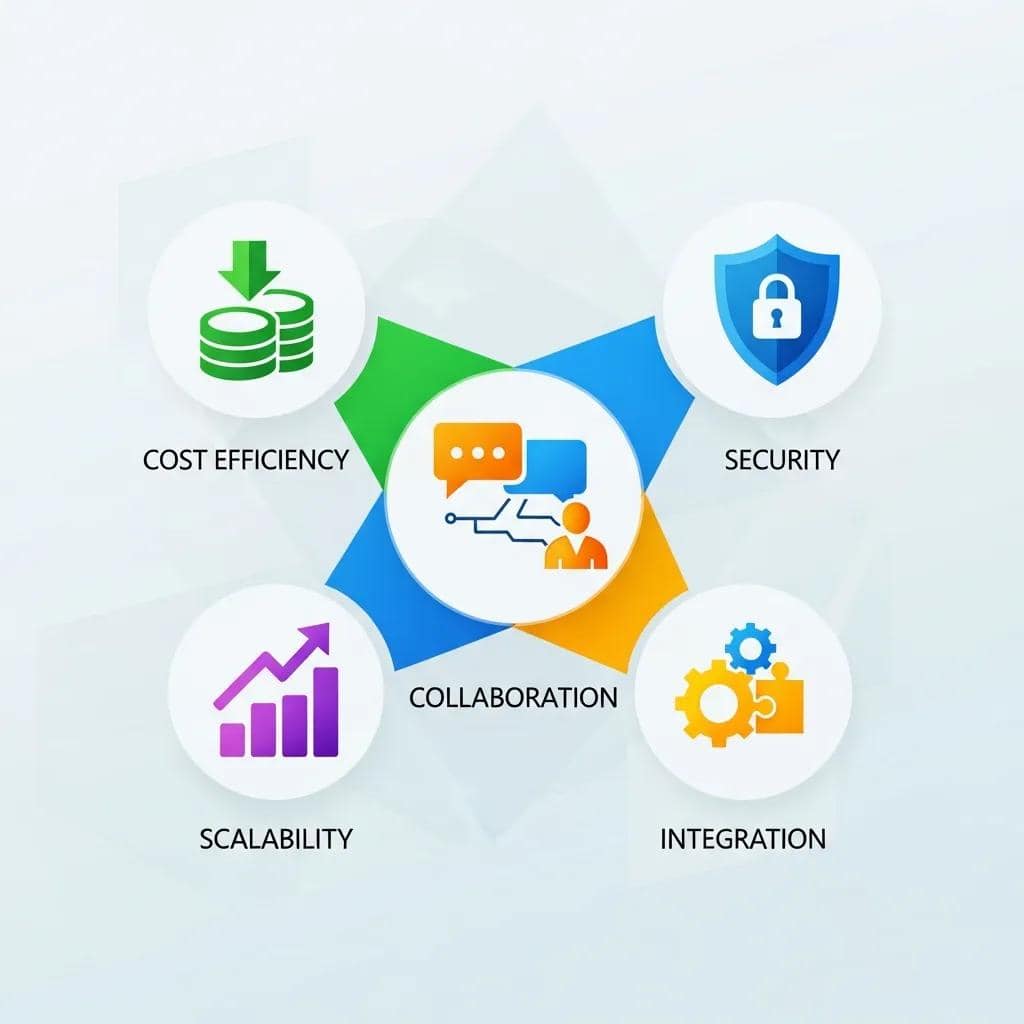
Microsoft 365 lowers cost by replacing multiple point solutions with a single subscription model and moving capital expenses to predictable operating costs. Consolidated licenses and cloud-hosted services also reduce maintenance and backup overhead. Security improves with native controls—multi-factor authentication (MFA), conditional access, Microsoft Defender, and data loss prevention (DLP)—which cut exposure to phishing and credential theft. Centralized admin and role-based access control speed routine tasks so IT teams can focus on higher-value work. Seeing how these pieces work together helps you prioritize investments like Defender tuning and license rightsizing to balance risk and spend.

How does Microsoft 365 improve business productivity and collaboration?

Microsoft 365 boosts productivity with integrated collaboration tools: Teams for meetings and chat, SharePoint for shared libraries, and OneDrive for personal files. Co-authoring, version history, and metadata search eliminate attachment chaos and reduce rework, shortening project cycles. Power Platform tools such as Power Automate connect Teams and SharePoint to automate approvals and notifications, increasing throughput without adding headcount. Mapping these capabilities to everyday workflows—meeting follow-ups, document reviews, and automated alerts—makes the return on collaboration tools concrete for SMBs.

What Comprehensive Microsoft 365 Managed Services Does Wahaya IT Provide?

Our Microsoft 365 managed services bundle assessment, configuration, security baseline setup, migration support, continuous monitoring, and helpdesk into a repeatable lifecycle that lowers your operational load and improves uptime. We start with discovery and inventory, plan and apply security and governance, execute migration and validation, and transition to ongoing optimization backed by SLAs. Centralizing these tasks with a single managed provider helps SMBs cut admin costs and keep consistent security controls across people and devices. Below is a concise service summary that highlights common managed areas and their business impact.

The following table summarizes core managed service areas, feature scope, and customer impact.

Service AreaManaged ScopeBusiness Benefit
Assessment & OnboardingDiscovery, inventory, migration planningClear migration roadmap and minimized downtime
Security & ComplianceBaseline policies, Defender, DLP, MFAReduced breach risk and stronger regulatory controls
User & License ManagementProvisioning, license optimization, reportingRightsized subscriptions and lower ongoing costs

How does Wahaya IT approach Microsoft 365 assessment, implementation, and ongoing support?

Wahaya IT is a Baton Rouge–based IT services firm focused on outsourced IT solutions for small and mid-sized businesses. We deliver managed services, cloud migration, cybersecurity, and Microsoft 365 support designed to simplify IT, lower costs, and strengthen security.

We follow a phased lifecycle: discovery and risk assessment, prioritized remediation and configuration, migration or cutover, then a transition to monitored operations with SLA-backed support and periodic optimization reviews. Deliverables typically include an inventory of mailboxes and apps, a security baseline checklist, migration validation reports, and monthly performance and license-usage summaries. Timelines scale to business size—small pilots in 1–2 weeks and phased migrations over 2–8 weeks—so continuity is preserved while each step is validated. Defined roles and checkpoints keep accountability across IT stakeholders, admins, and end users.

Which core Microsoft 365 services are included in Wahaya IT's management offerings?

Our managed scope covers Exchange Online administration, Teams governance, SharePoint Online architecture, OneDrive sync support, Defender monitoring, Intune device management, and Azure AD sync services. We deploy baseline policies, governance templates for Teams and SharePoint, mailbox migration support, conditional access rules, device enrollment, and routine patch and update checks. The table below maps services to their managed scope and customer value.

ServiceManaged ScopeCustomer Benefit
Exchange OnlineMigration, mailbox policies, spam filteringReliable email with less admin overhead
SharePoint/OneDriveSite design, permissions, retention policiesOrganized content and controlled sharing
Defender & IntuneThreat detection, device enrollment, policy tuningEndpoint protection and compliance alignment

How Can Businesses Optimize Microsoft 365 Security and Compliance?

Optimizing Microsoft 365 security means aligning identity, endpoint, and data protection to lower common SMB risks like phishing, credential theft, misconfigured sharing, and unmanaged devices. The practical mix uses Azure AD controls (MFA, conditional access), Defender for detection and response, Intune for device posture, and DLP for sensitive data protection. Building a layered baseline reduces risk and creates evidence useful for compliance frameworks such as HIPAA or GDPR when required. The next sections list typical challenges and hands-on guidance SMBs can apply right away.

Below are essential security controls to prioritize:

  • Enable multi-factor authentication (MFA) and conditional access to protect sign-ins.
  • Protect endpoints with Microsoft Defender and managed Intune policies.
  • Use DLP, retention, and secure sharing policies to guard sensitive information.

These controls form a practical baseline that most SMBs can implement quickly to reduce exposure in a meaningful way.

What are common security challenges in Microsoft 365 for SMBs?

Common issues include credential compromise via phishing, overly broad external sharing that causes data leakage, and unmanaged endpoints lacking threat protection. Misassigned admin roles and stale accounts also increase attack surface, while missing DLP or retention policies let sensitive data move uncontrolled. Quick mitigations are enabling MFA for everyone, tightening external sharing at the tenant or site level, reviewing privileged admin assignments, and deploying Defender baseline policies. Fixing these operational gaps establishes a stable foundation for more advanced detection and incident response.

How does Wahaya IT implement Microsoft Defender, Intune, and data loss prevention?

We roll out security pragmatically: pilot Defender with targeted policies for malware protection, email filtering, and attack surface reduction, then expand tenant-wide after tuning. Intune enrollment starts with a pilot group to validate device compliance, profiles, and app access before a broad rollout. DLP policies focus first on high-risk content (financial data, PII) in monitoring mode, then move to enforcement once tuned. Our implementation checklist covers pilot design, policy templates, user communications, monitoring playbooks, and scheduled reviews to keep detection accurate and false positives low.

Security ToolControl TypeThreats Mitigated / Recommended Config
Microsoft DefenderEndpoint & email protectionMalware and phishing; enable ATP and automated investigation
IntuneDevice compliance & configurationUnmanaged devices; enforce encryption and patching
DLPData protection & policy enforcementAccidental sharing and exfiltration; classify and enforce policies

What Are Best Practices for Seamless Microsoft 365 Migration and Deployment?
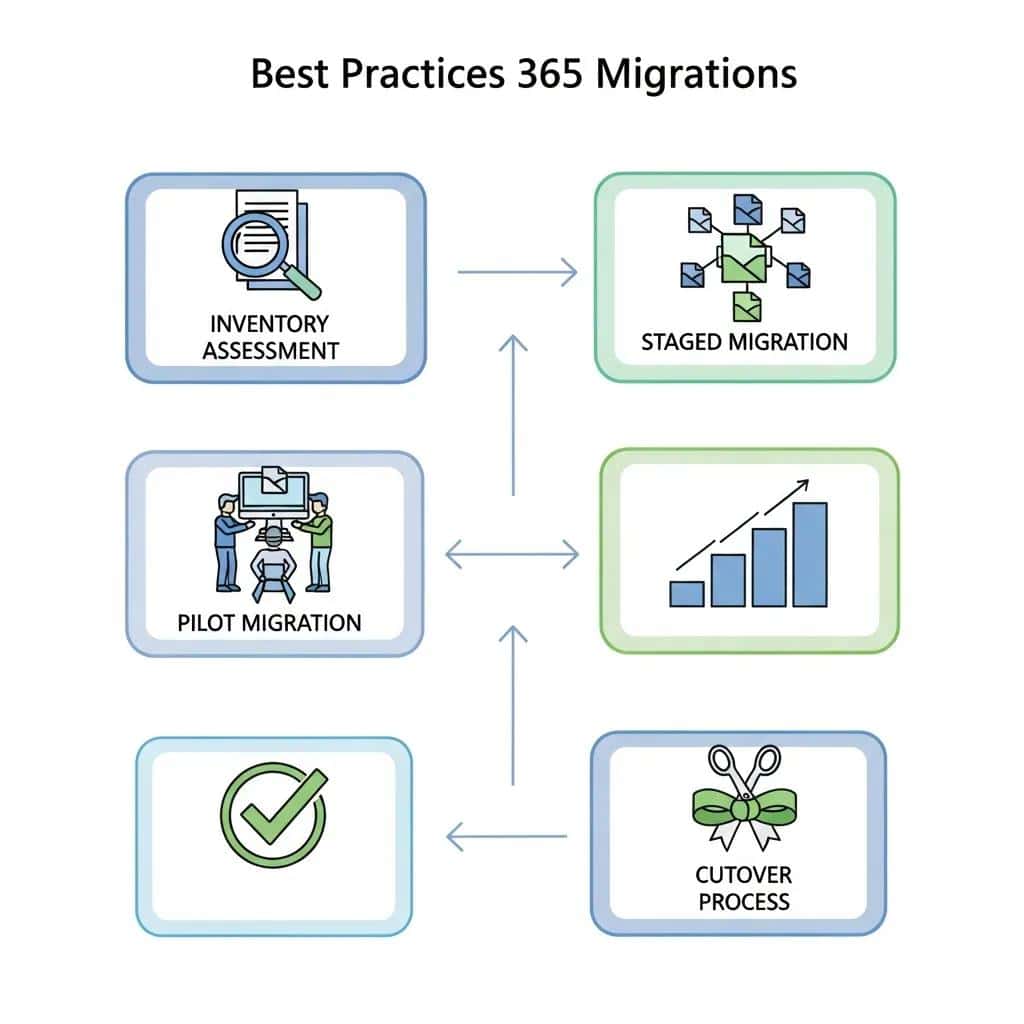
A smooth Microsoft 365 migration follows phased planning: inventory and discovery, pilot and validation, staged migration, cutover, and post-migration verification. Each phase reduces risk by testing assumptions with pilots and keeping rollback points, which limits disruption. Best practices include preserving metadata, keeping coexistence where needed during cutover, and moving active users and collaboration sites first to minimize perceived downtime. The checklist below is a practical guide you can follow during migration.

The strategic benefits—cost savings and operational gains—are backed by broader cloud-adoption analyses and case studies.

Microsoft 365 Cloud Migration & Cost Savings

This study follows how organizations compare on-prem stacks to cloud alternatives, evaluate different cloud platforms, and plan migrations. It walks through transferring an Exchange environment to Azure, the decision logic behind key steps, and a real-world savings calculation. The paper serves as both a reference and a practical guide for planning a responsible cloud migration.

An Analysis of the Microsoft 365 Cloud Migration Process, its Alternatives, and Results, 2022

This migration checklist lists the core phases and immediate actions.

  • Inventory & Assessment: Catalogue mailboxes, sites, third-party integrations, and compliance needs.
  • Pilot Migration: Move a small, representative user group and validate mail flow, permissions, and client behavior.
  • Staged Migration: Migrate prioritized groups, check data integrity, and fix issues iteratively.
  • Cutover & Validation: Finalize DNS changes, complete mailbox moves, and run post-migration tests.
  • Optimization & Handoff: Apply governance templates, train users, and schedule review windows.

How to plan and execute Microsoft 365 migration for small and mid-sized businesses?

Begin with a full assessment that inventories mailboxes, shared resources, third-party connectors, and compliance constraints—this determines the migration method and timeline. For most SMBs, a staged migration minimizes risk: pilot a small user set, validate mail routing and clients, then migrate in waves by business unit. Provide user communications and a rollback plan for surprises. Use validation checkpoints—login, mail flow, permissions, search—to confirm each wave is stable before moving on, keeping continuity and predictable post-migration support.

What hybrid environment strategies and data transfer methods ensure smooth deployment?

Choose hybrid identity vs. cloud-only based on directory complexity, legacy apps, and regulatory requirements. Azure AD Connect supports hybrid scenarios; cloud-only simplifies administration for many SMBs. Migration methods include IMAP for basic mailbox moves, PST import for small legacy stores, and third-party tools for complex migrations that need calendar and permission fidelity. Plan bandwidth, throttling, and migration windows to avoid user impact and maintain consistent performance during bulk transfers.

How Can Businesses Maximize ROI Through Microsoft 365 Cost and License Management?

To maximize ROI, run regular license audits, rightsize subscriptions, and match user roles to the feature sets they actually use so you only pay for what you need. Inventory assigned licenses, measure feature usage (for example, who uses Defender or E5 features), reclaim inactive seats, and map roles to appropriate license tiers. Annual forecasting and subscription reviews reduce surprises and inform procurement decisions. The table below helps SMBs match common user profiles to license tiers and cost-saving approaches.

This license comparison helps align roles with tiers and highlights cost-saving tactics.

License TypeTypical Included FeaturesCost-Saving Strategy / Best For
Business PremiumOffice apps, Teams, Defender for BusinessSmall organizations needing integrated security
E3Advanced compliance, analytics, Office appsOrganizations requiring compliance and reporting
E5Advanced security and telephonyEnterprises needing full security stack and voice features

What strategies optimize Microsoft 365 licensing and reduce operational costs?

Useful tactics include regular license audits to reclaim unused seats, mapping users to the minimal license that meets their needs, replacing overlapping third-party tools with built-in M365 features, and using shared or resource accounts where appropriate. Automating provisioning and deprovisioning through identity lifecycle policies cuts orphaned accounts that waste licenses. Typical savings come from reclaiming inactive accounts and assigning power users to the right tier instead of defaulting to higher-cost licenses.

How does Wahaya IT help SMBs with subscription management and budget planning?

Wahaya IT performs license audits, forecasts subscription needs for growth scenarios, and gives procurement guidance to align licensing with roles and budgets. We provide ongoing monitoring reports that surface underused licenses and actionable optimization recommendations to trim spend. Our messaging reinforces the practical value: we simplify IT operations, reduce costs, and improve security while helping you get the most from Microsoft 365.

How Does Wahaya IT Support User Adoption, Training, and Automation in Microsoft 365?

Successful Microsoft 365 projects deliver technical migration plus measurable adoption. Adoption grows through targeted training, role-based guidance, and automation that cuts repetitive work. Our training mixes end-user workshops, admin training, and on-demand modules. Automation with Power Platform—Power Automate flows and lightweight Power Apps—speeds approvals, onboarding, and ticket routing so staff spend less time on manual steps. The next sections outline training plans and automation examples that demonstrate ROI in saved time and fewer tickets.

Effective adoption combines focused training, executive sponsorship, and measurable KPIs like fewer helpdesk tickets and higher active use of Teams and SharePoint.

What training programs improve Microsoft 365 user productivity and change management?

Training should be role-based: end-user sessions cover Teams, co-authoring, and OneDrive basics; power-user workshops teach SharePoint site management and Flow design; admin sessions focus on security operations, conditional access, and governance. Blend live workshops, recorded modules for on-demand learning, and hands-on labs to reinforce skills. Measure success with adoption rates, reduced helpdesk volume, and faster completion of routine processes to guide refresher training.

How can Power Platform and automation workflows enhance business efficiency?

Power Platform enables low-code automation such as approval flows for purchase requests, onboarding checklists that provision accounts and resources, and ticket routing that assigns incidents automatically. For example, a new-hire onboarding flow can create an Azure AD account, provision a mailbox and Teams groups, and notify HR—cutting manual steps and errors. Measure ROI by time saved per process, fewer handoffs, and reduced errors; many automation projects pay back in months through reclaimed staff time.

External research also highlights how Power Platform streamlines operations and improves productivity.

Power Platform Automation for Business Productivity

Automation with Microsoft Power Platform is enabling organizations to streamline processes, boost productivity, and reduce manual tasks.

Automation Using Power Platform, 2023

Wahaya IT is a Baton Rouge–based IT services firm focused on outsourced IT solutions for small and mid-sized businesses. We deliver managed services, cloud migration, cybersecurity, and Microsoft 365 support designed to simplify IT, lower costs, and strengthen security.


To request an assessment or consultation, contact Wahaya IT at [email protected] or +1 225-273-1206, or visit our office at 4229 North Blvd, Baton Rouge, LA 70806 for in-person inquiries.