
Cloud Computing Solutions for Louisiana Businesses: Comprehensive Guide to Migration, Management, and Security

Cloud computing for businesses is the practice of delivering scalable IT resources over the internet—compute, storage, networking, and managed platforms—that reduce capital costs while improving agility, performance, and security. This guide explains how cloud adoption delivers cost-efficiency, on-demand scalability, and stronger security controls for Louisiana organizations, and it outlines practical migration steps, managed service options, and compliance considerations. Many local companies face tight budgets, legacy applications, seasonal demand swings, and regulatory obligations; cloud solutions address these by shifting to usage-based billing, enabling elastic resources, and centralizing security and logging for audit readiness. Readers will learn the core benefits of cloud computing in a Louisiana context, a step-by-step migration framework for Baton Rouge SMBs, comparative guidance on major cloud platforms, managed service capabilities (including Microsoft 365 integration), essential security and compliance controls, hybrid deployment patterns, and concrete cost-optimization tactics. By the end you’ll have a prioritized checklist for migration and practical criteria to choose platforms and managed providers suited to local constraints and goals.

What Are the Key Benefits of Cloud Computing for Louisiana Businesses?

Cloud computing delivers operational agility, cost control, improved resilience, and centralized security by replacing large capital expenditures with scaled, consumption-based services. The mechanism behind these benefits includes auto-scaling compute, managed patching and updates, encrypted storage, and distributed backup that together reduce downtime and simplify compliance workflows. Louisiana companies benefit specifically from seasonal scaling during peak demand (retail, tourism) and rapid provisioning for project-based work (construction, oilfield services), which removes delays tied to hardware procurement. The following list highlights the top benefits that matter for local SMBs and public-facing organizations, and the EAV table below maps each benefit to its enabling attribute and a concrete value proposition.

Cloud computing benefits for Louisiana organizations include:

  1. Cost Flexibility: Pay-as-you-go billing converts capital expenses into predictable operating expenses.
  2. Elastic Scalability: Auto-scaling matches capacity to demand without overprovisioning.
  3. Improved Resilience: Managed backup and DR reduce recovery time after outages or storms.
  4. Centralized Security and Compliance: Encryption, IAM, and logging streamline audits and controls.

Local providers (like Wahaya IT) can help realize these benefits through managed cloud services tailored for Baton Rouge and nearby markets, especially where minimizing downtime and maintaining clear communication are priorities. Understanding these core advantages leads directly into how cloud mechanics like auto-scaling and managed security operate in practice for Louisiana workplaces.

Different cloud benefits map to specific mechanisms and measurable outcomes for local businesses.

Benefit AreaMechanismConcrete Value
ScalabilityAuto-scaling / Elastic computeScale during peak season without new hardware
Cost EfficiencyPay-as-you-go billingLower TCO by avoiding upfront server purchases
Business ContinuityManaged backups & DRFaster recovery after outages with defined RTO/RPO
Security & ComplianceEncryption, IAM, centralized loggingSimplified audits and reduced breach risk

This mapping shows how each benefit becomes actionable through specific cloud features, helping decision makers prioritize initiatives while preparing for migration.

How Does Cloud Computing Enhance Business Flexibility and Scalability in Louisiana?

Cloud-enabled flexibility comes from elastic resource allocation, automated provisioning, and platform services that let teams spin up environments in minutes rather than weeks. Auto-scaling groups, serverless functions, and container orchestration allow workloads to expand during peak traffic and contract during slow periods, which directly reduces waste and supports seasonal business models common in Louisiana. For example, a retail operation can automatically add web servers during holiday shopping, while a construction firm can provision project-specific collaboration and CI/CD pipelines on demand. Monitoring triggers and alerts tied to utilization metrics guide when to scale and when to apply cost controls, and adopting these triggers reduces manual intervention while preserving performance.

These capabilities naturally lead to decisions about monitoring, cost thresholds, and automation policies that inform migration planning and ongoing management.

In What Ways Does Cloud Adoption Improve Security and Compliance for Local Companies?

Cloud adoption strengthens security posture by centralizing identity and access management, enforcing encryption in transit and at rest, and providing immutable audit logs for compliance reporting. Managed security services and platform-native controls (MFA, role-based access, SIEM integration) reduce the administrative burden on small IT teams while improving detection and response times. For regulated sectors in Louisiana, cloud providers support contractual safeguards such as BAAs and offer compliance frameworks that map controls to HIPAA and PCI requirements, easing audit preparation. Implementing these cloud controls also enables consistent patch management and reduces the attack surface of legacy on-premises systems.

Understanding these controls points directly to the need for thorough migration planning, including inventorying sensitive systems and defining compliance-focused cutover plans for each application.

How Can Louisiana Businesses Successfully Migrate to the Cloud?
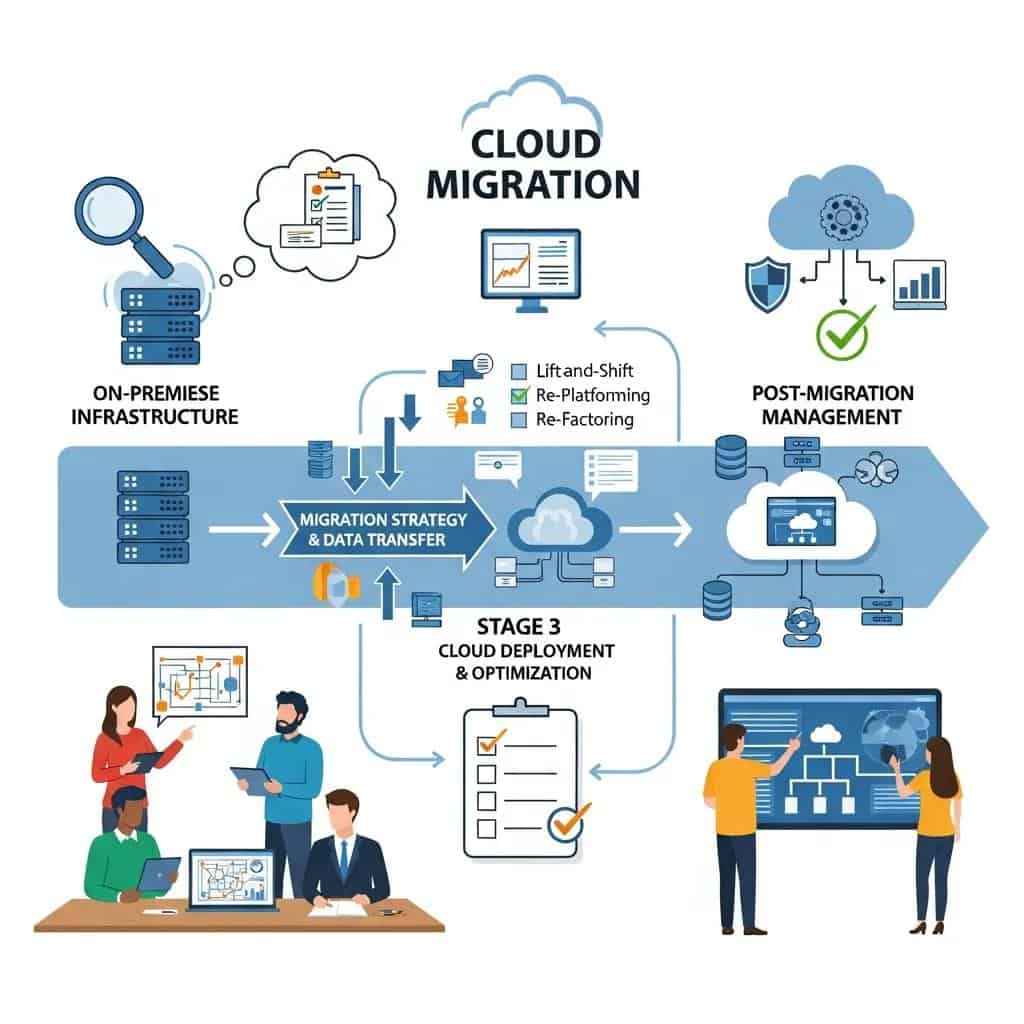
A successful cloud migration follows a structured process of discovery, planning, pilot, migration, validation, and optimization designed to limit downtime and preserve application integrity. The why and how come from assessing application dependencies, network capacity, and compliance constraints to choose the right migration approach—lift-and-shift for speed, replatforming for efficiency, or refactoring for long-term agility. Proper pilot testing validates performance under realistic loads and makes rollback procedures available, while staged cutovers and phased migrations reduce risk for business-critical services. Below is a numbered step-by-step migration checklist tailored for Baton Rouge SMBs, followed by an EAV comparison of migration approaches to help choose the right path.

Key migration steps for Baton Rouge SMBs:

  1. Discovery & Inventory: Catalog applications, data sensitivity, and interdependencies.
  2. Assessment & Prioritization: Score workloads by cloud readiness and business impact.
  3. Pilot & Proof-of-Concept: Validate architecture, bandwidth, and security controls at scale.
  4. Phased Migration: Migrate in waves, beginning with low-risk systems.
  5. Validation & Cutover: Test functionality, performance, and compliance before final cutover.
  6. Optimization & Monitoring: Rightsize resources and enable continuous monitoring post-migration.

Selecting an appropriate migration approach affects downtime risk and time-to-value; the table below compares common options for clarity.

ApproachCharacteristicImpact on Downtime
Lift-and-ShiftMinimal code changes, fastest migrationLow to moderate downtime if planned
ReplatformingMinor code changes to use platform servicesModerate downtime with performance gains
RefactoringRedesign for cloud-native architectureHigher short-term complexity, lower long-term costs

This comparison helps local teams choose a migration route that balances speed, complexity, and future operational benefits. For organizations seeking hands-on assistance, Wahaya IT offers a migration methodology that emphasizes discovery, pilot testing, and phased cutovers to minimize downtime and ensures proactive communication during each stage; businesses can request a discovery call or a free assessment to begin prioritizing workloads for migration.

What Is the Step-by-Step Cloud Migration Process for Baton Rouge SMBs?

The migration process begins with a thorough discovery phase to identify all assets, followed by a risk assessment that ranks systems by business criticality and compliance needs. Planning translates those findings into a prioritized migration backlog that includes timelines, rollback strategies, and network bandwidth checks tailored to local ISP constraints. Pilots validate assumptions and provide performance baselines while phased migrations move groups of workloads in controlled waves to limit user impact. Post-migration validation checks functionality, performance, backup integrity, and compliance artifacts, and final optimization rightsizes resources and implements cost controls.

These stages set the foundation for choosing the right cloud platform, which depends on existing technology stacks and future workload needs.

Which Cloud Platforms Are Best Suited for Louisiana Businesses: Azure, AWS, or Google Cloud?

Platform selection depends on existing technology investments, compliance needs, and workload characteristics; Microsoft-centric environments typically favor Azure for native Microsoft 365 integration and Active Directory tie-ins. AWS offers broad service breadth and mature ecosystem capabilities for complex, enterprise-scale workloads, while Google Cloud is often chosen for data analytics and AI workloads where cost-effective compute and managed data services matter. Decision criteria should include identity integration, managed service availability, regional performance, pricing models, and the provider’s compliance offerings for HIPAA and PCI. For many Baton Rouge SMBs, the right choice balances existing licenses and skills with the platform that minimizes migration toil and supports managed services.

Platform choice naturally influences managed service requirements and security controls, which are discussed in the next section focused on provider offerings.

What Managed Cloud Services Does Wahaya IT Offer to Baton Rouge Businesses?

Wahaya IT provides managed cloud services that address migration, ongoing infrastructure management, security, and Microsoft 365 integration designed for Baton Rouge businesses seeking cost-effective, reliable, and customized solutions. Their service model emphasizes proactive communication, seamless migrations with minimal downtime, and ongoing monitoring to detect incidents early and maintain productivity. Core managed offerings include migration planning and execution, 24/7 infrastructure monitoring, managed Microsoft 365 tenant administration, and cloud security services that map to compliance requirements. The following list outlines primary managed services and the one-sentence value proposition for each so readers can quickly align needs with available support.

  • Migration Services: Tailored migrations that minimize downtime and preserve data integrity.
  • Managed Microsoft 365: Tenant configuration, licensing optimization, and user support for improved collaboration.
  • Cloud Infrastructure Management: 24/7 monitoring, patching, and performance tuning to keep systems available.
  • Cloud Security & Compliance Support: Policy implementation, logging, and audit readiness for regulatory needs.

Below is a short table summarizing common managed infrastructure features and the value they provide to local businesses.

Service AreaFeatureBusiness Value
Monitoring24/7 alerting & reportingFaster incident detection and reduced outage time
PatchingRegular system updatesLower vulnerability exposure and compliance support
BackupsManaged backup & DR testingPredictable recovery objectives and continuity
SupportLocalized communication & escalationClear accountability and faster local response

These managed services are structured to complement in-house teams and to provide clear SLAs and reporting that support executive decision-making. If you need a deeper assessment of current cloud costs or a migration readiness review, Wahaya IT can provide a discovery call and assessment tailored to Baton Rouge organizations seeking a low-risk path to the cloud.

How Does Managed Microsoft 365 Integration Support Louisiana SMB Productivity?

Managed Microsoft 365 integration centralizes identity, optimizes licensing, configures security baselines, and automates backups to reduce administrative overhead and enhance collaboration. Tenant setup includes secure configurations such as conditional access and multifactor authentication, while user provisioning and license management align costs with actual usage. Training and adoption support accelerate user productivity by teaching teams how to leverage collaboration tools, automations, and secure sharing practices. These managed tasks reduce helpdesk tickets, strengthen email security, and enable mobile and remote workers to stay productive with consistent policies across devices.

These integration outcomes feed into broader cloud governance and monitoring strategies that maintain performance and compliance over time.

What Are the Features of Cloud Infrastructure Management and Monitoring Services?

Infrastructure management typically combines 24/7 monitoring, automated patching, incident response, backups, and periodic performance reporting to ensure systems remain available and efficient. Monitoring and alerting detect anomalies and allow rapid remediation, while patch management reduces exposure to vulnerabilities that can lead to downtime or compliance failures. Reporting and performance tuning help rightsizing decisions and cost control, and defined incident response procedures clarify escalation paths and recovery timelines. Example SLAs can include response time targets for critical incidents and scheduled maintenance windows to minimize business disruption.

These operational controls reduce business risk and prepare organizations for compliance audits, which ties into the security controls described next.

How Do Cloud Security and Compliance Solutions Protect Louisiana Businesses?

Cloud security solutions protect businesses by enforcing encryption, granular identity and access controls, centralized logging, and managed detection that together reduce breach likelihood and accelerate incident response. The mechanisms include encryption in transit and at rest, IAM policies with least-privilege principles, MFA, and SIEM-enabled logging for forensic analysis. Mapping these controls to regulatory frameworks like HIPAA and PCI involves contractual safeguards, audit artifacts, and documented processes that demonstrate control implementation. The checklist below summarizes essential security measures and the mapping table that follows shows how cloud controls align with common compliance requirements.

Essential cybersecurity measures for cloud environments:

  1. Multi-factor Authentication and IAM: Prevent unauthorized access and enforce role-based permissions.
  2. Encryption and Key Management: Protect data in transit and at rest with managed key rotation.
  3. Centralized Logging and SIEM: Maintain audit trails and enable rapid threat detection.

This set of measures provides the foundation for compliance mapping and audit readiness, which the next subsection addresses in detail.

What Cybersecurity Measures Are Essential for Cloud Environments in Louisiana?

Essential measures include enforcing multi-factor authentication across all accounts, implementing fine-grained IAM roles, encrypting data both in transit and at rest, and integrating logs into centralized monitoring and SIEM platforms for real-time threat detection. Prioritization for SMBs should begin with MFA and least-privilege roles, followed by automated patching and backups to reduce exposure and restore capability after incidents. Regular security assessments and tabletop exercises validate incident response procedures and help refine detection thresholds. A readiness checklist should list MFA rollout, encrypted backups, IAM review cadence, and SIEM alert tuning to ensure practical, measurable controls.

These core controls support compliance mapping for HIPAA and PCI, which require both technical and administrative safeguards.

How Do Cloud Solutions Help Meet HIPAA, PCI, and Other Compliance Requirements?

Cloud platforms assist compliance by offering built-in controls such as encryption, logging, role-based access, and contractual offerings (e.g., BAAs) that allow covered entities and service providers to satisfy regulatory obligations. Mapping requirement to controls typically shows encryption and access controls covering data protection requirements, logging and retention addressing audit trails, and contractual agreements handling third-party responsibilities. Preparing for audits involves documenting configurations, retaining logs for required periods, and demonstrating periodic testing of backups and access reviews. These steps form a defensible posture that auditors can verify through evidence collected from cloud-native logging and managed service reports.

This compliance mapping informs choices about hybrid or fully cloud deployments depending on data residency and latency needs.

What Are the Advantages of Hybrid Cloud Solutions for Louisiana SMBs?

Hybrid cloud architectures combine on-premises systems with public cloud services to balance latency, legacy application support, cost control, and data locality needs. The approach is useful when legacy databases require low-latency local access while analytics or web tiers run in the public cloud for elasticity. Architectures that place sensitive databases on-premises but burst analytics to the cloud can lower costs while preserving performance. Best practices for hybrid implementations include well-defined network boundaries, consistent security policies across environments, and robust DR alignment so failover scenarios are tested and predictable.

These hybrid patterns point to workload placement strategies and cost-performance trade-offs that local IT teams should evaluate when planning migration waves.

How Can Hybrid Cloud Strategies Optimize Performance and Cost for Local Businesses?

Hybrid strategies optimize cost and performance by placing latency-sensitive workloads on-premises while shifting bursty or compute-heavy tasks to the cloud, using cloud bursting, tiered storage, and container orchestration for portability. Example scenarios include keeping transactional databases on local infrastructure while running analytics clusters in the cloud during reporting periods, or storing archival data in lower-cost cloud storage with fast local caches for hot datasets. Network planning and connectivity choices determine how seamless bursting feels to users and affect egress and latency costs. Deciding which workloads to keep local versus cloud should be based on a cost-performance matrix informed by monitoring data.

Clear workload placement decisions enable consistent monitoring and security across environments, which helps implement the best practices listed next.

What Are the Best Practices for Implementing Hybrid Cloud in Baton Rouge?

Best practices include defining clear security perimeters, using VPNs or dedicated connectivity for predictable performance, maintaining consistent identity and policy management across environments, and regularly testing failover and disaster recovery procedures. Ensure ISP redundancy and bandwidth assessments account for regional service variability to avoid migration bottlenecks during cutover. Implement centralized monitoring and unified alerting to avoid blind spots between on-prem and cloud resources. Regularly review cost and performance metrics and adjust workload placement as business needs change.

Following these practices reduces the risk of unexpected performance bottlenecks and ensures hybrid deployments deliver predictable value for local operations.

How Can Louisiana Businesses Optimize Cloud Costs and Maximize ROI?

Cost optimization and ROI require a blend of rightsizing, reserved instance or savings plans, scheduled resource suspension for nonproduction environments, and tagging for visibility and chargeback. Rightsizing adjusts compute and storage to actual usage, reserved commitments lower unit costs for predictable workloads, and autoscaling prevents overprovisioning while maintaining performance during peaks. A simple ROI formula—(Annualized Benefits − Annualized Cloud Costs) / Annualized Cloud Costs—helps quantify value by including measurable benefits like reduced downtime, lower maintenance labor, and productivity gains. The table below compares cost-optimization tactics with expected savings and trade-offs to guide prioritization.

Common cost-optimization tactics:

  1. Rightsizing and Autoscaling: Match resources to demand to remove unused capacity.
  2. Reserved Instances & Savings Plans: Commit to predictable workloads for discounted pricing.
  3. Scheduled Resource Shutdowns: Turn off development/test resources during off-hours.
TacticMechanismEstimated Savings / Trade-off
RightsizingAdjust instance sizes10–40% savings; requires monitoring
Reserved InstancesCommit to usage20–60% savings; reduces flexibility
Scheduled ShutdownsAutomation for nonproduction5–30% savings; needs governance

These tactics, combined with tagging and reporting to attribute costs to teams, produce measurable ROI and support internal chargeback models. For a hands-on review, Wahaya IT provides cloud cost reviews that identify immediate savings opportunities and recommend a phased plan to capture them with minimal disruption.

What Strategies Reduce Cloud Spend While Maintaining Performance?

Practical strategies include implementing autoscaling to align capacity with traffic patterns, using reserved instances or committed use discounts for stable workloads, and tiering storage to match access frequency. Storage lifecycle policies move cold data to lower-cost tiers automatically, while scheduled shutdowns reduce waste on development environments. Monitoring-based rightsizing identifies oversized instances and recommends smaller instance types without harming performance. Choosing the right mix depends on workload predictability and business tolerance for committed spend versus flexibility.

These strategies feed directly into ROI calculations, which clarify the financial case for migration and ongoing optimization.

How to Calculate Cloud Computing ROI for Small and Mid-Sized Businesses in Louisiana?

A straightforward ROI calculation starts by quantifying annualized benefits—reduced hardware costs, lower downtime, decreased maintenance labor, and productivity gains—then subtracting annualized cloud costs and dividing by cloud costs. For example, if cloud adoption reduces hardware refresh costs by $30,000, cuts downtime losses by $20,000, and reduces staff maintenance time worth $10,000 (total benefits $60,000) against annual cloud costs of $30,000, the ROI is (60,000 − 30,000) / 30,000 = 1.0 or 100% return. Track variables such as average hourly downtime cost, staff hours saved, and license consolidation gains to refine the model. Sensitivity analysis on utilization and discount levels helps local leaders understand how different assumptions affect outcomes.

Quantifying these elements creates a defensible business case that complements technical readiness and operational planning.

Cost Optimization Comparison Table

This table summarizes common cost-optimization tactics, their mechanisms, and typical impact levels for quick executive review.

StrategyAttributeValue / Trade-off
RightsizingMonitor & adjust10–40% savings; needs continuous monitoring
Reserved CommitmentsPrepaid/committed use20–60% savings; less flexible
AutomationScheduled shutdowns5–30% savings; governance required

Cloud Computing Solutions for Louisiana Businesses: Comprehensive Guide to Migration, Management, and Security

Cloud computing for businesses is the practice of delivering scalable IT resources over the internet—compute, storage, networking, and managed platforms—that reduce capital costs while improving agility, performance, and security. This guide explains how cloud adoption delivers cost-efficiency, on-demand scalability, and stronger security controls for Louisiana organizations, and it outlines practical migration steps, managed service options, and compliance considerations. Many local companies face tight budgets, legacy applications, seasonal demand swings, and regulatory obligations; cloud solutions address these by shifting to usage-based billing, enabling elastic resources, and centralizing security and logging for audit readiness. Readers will learn the core benefits of cloud computing in a Louisiana context, a step-by-step migration framework for Baton Rouge SMBs, comparative guidance on major cloud platforms, managed service capabilities (including Microsoft 365 integration), essential security and compliance controls, hybrid deployment patterns, and concrete cost-optimization tactics. By the end you’ll have a prioritized checklist for migration and practical criteria to choose platforms and managed providers suited to local constraints and goals.